Studio software · Built by Reminiscent Road Media in Houston
Every client is a story. We build the book it’s written in.
Reminiscent Chronicles is a family of five products for photo and film studios, one for each chapter of a client’s story: the inquiry and the contract, the shoot day, the cull, the cut and the review.
14-day free trial. No card needed to start.
Contents
Five chapters. One family.
Start with the one that solves this month’s problem. Each product works on its own, and each is built by the same studio to the same standard.
- 01
 StudioInquiries, contracts, invoices, scheduling and galleriesThe business
 - 02
 CallBoardCall sheets, talent intake, releases and day-of updatesThe shoot day
 - 03
 DarkroomCulling, ratings, metadata and exports on your own computerThe photo lane
 - 04
 CutroomTranscripts, clean-up, captions and first assemblies in DaVinci ResolveThe edit bay
 - 05
 Post-ProductionTimecoded notes, versions, approvals and screeningsThe review room
Chapter 01 · The business
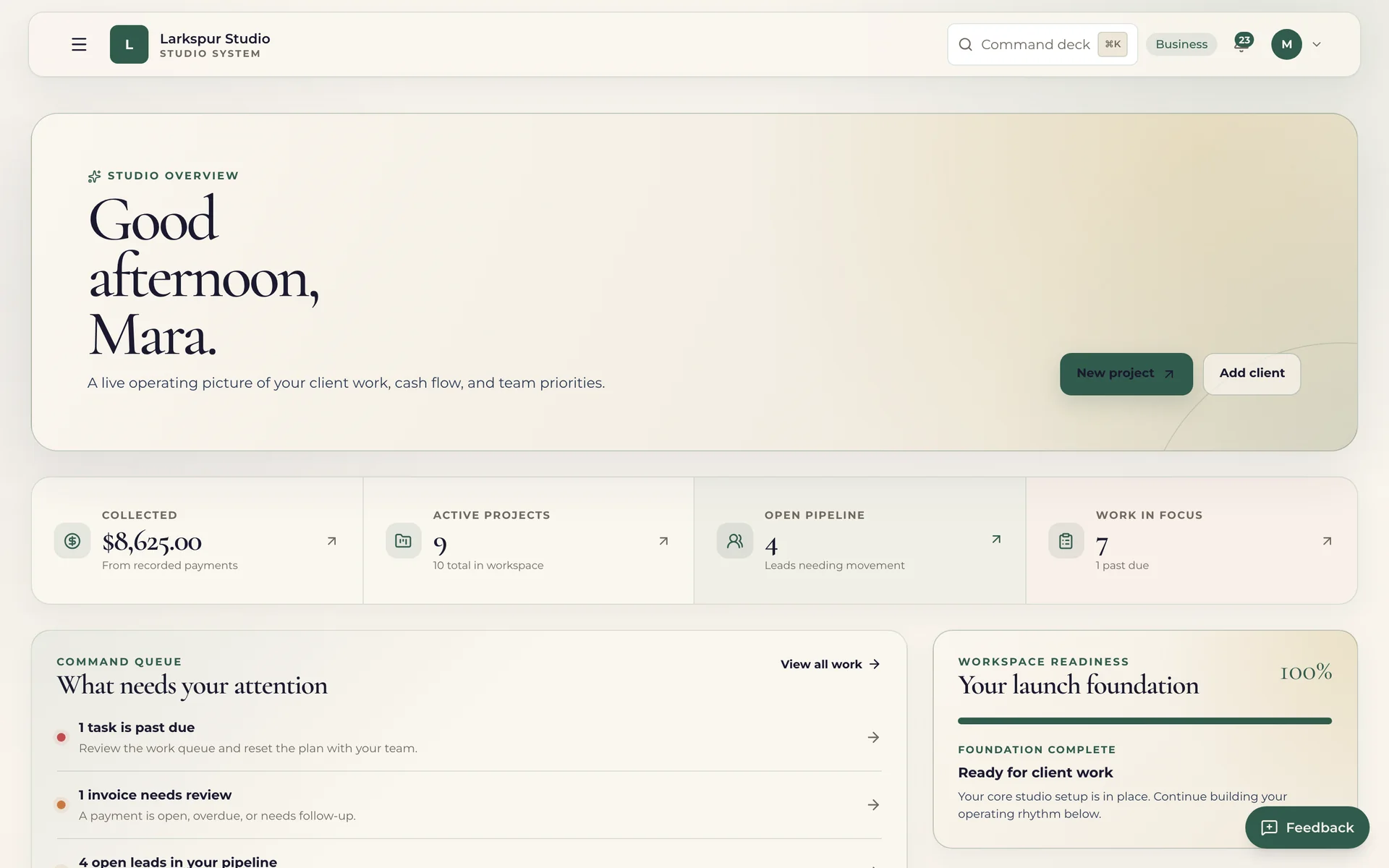
Studio
The client record, from first hello to paid in full.
Leads arrive from your forms and booking pages. Proposals become signed contracts, invoices collect deposits and installments through Stripe, and every project keeps its documents, dates and payments together.
- Lead forms and booking pages that turn a request into a client and a project.
- Proposals, contracts and e-signatures, with the signature trail kept on the record.
- Invoices through Stripe with deposits and installment plans, paid into your own account.
- Pages for your clients to sign contracts and pay invoices from a secure link.
From — a monthTalk to us for pricing
Read the Studio chapter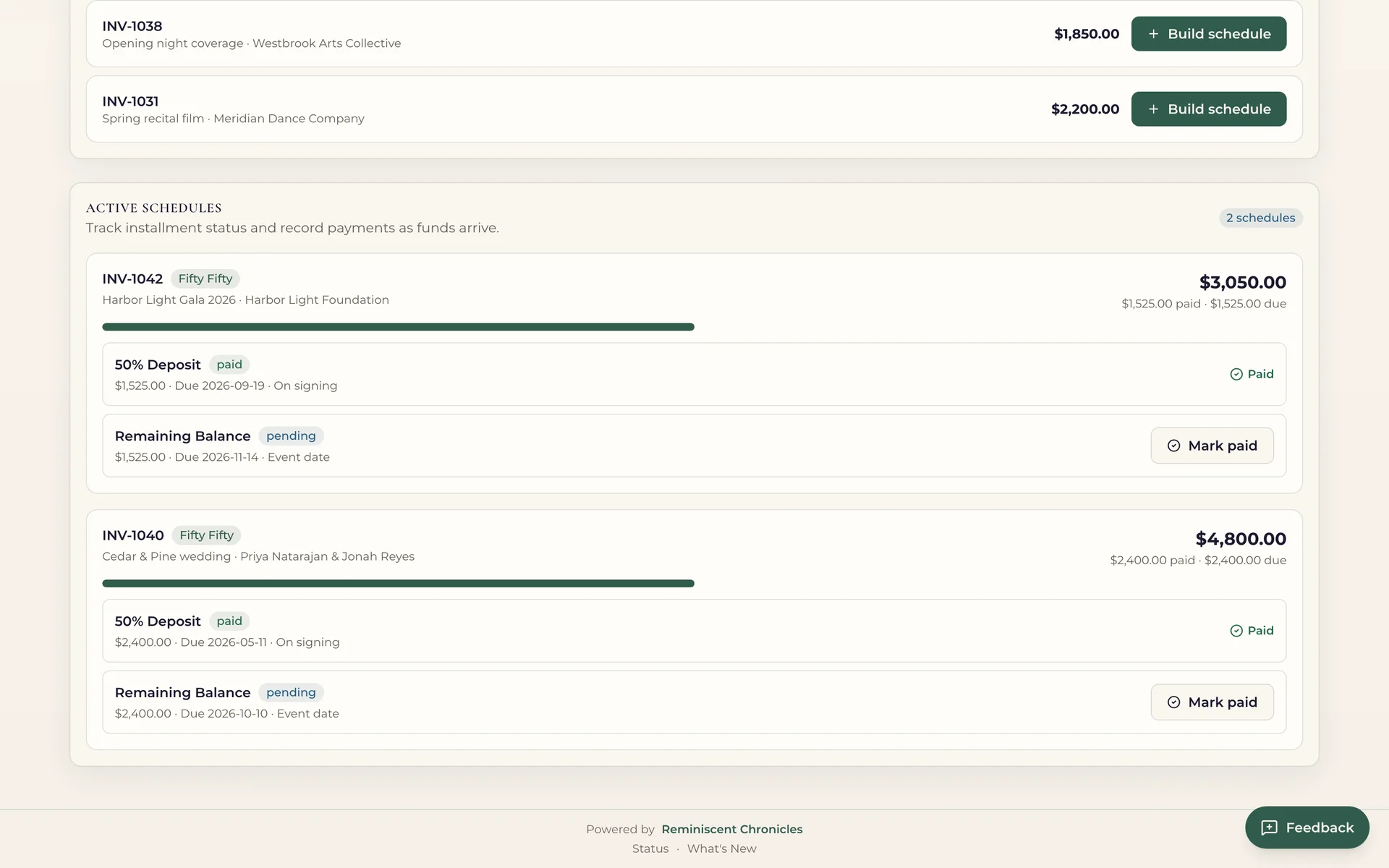
Chapter 02 · The shoot day
CallBoard
Everyone knows where to be, and what they have signed.
Build the day from time blocks, print the call sheet, and bring talent in through a project link that needs no account or app. Releases are signed before anyone arrives.
- Schedules built from time blocks, with a printable call sheet for the day.
- Talent intake by link — no account, password or app download for talent.
- Releases signed electronically, with guardian consent for minors.
- Updates to the whole call list when plans change.
From — a monthTalk to us for pricing, or — a month added to Studio
Read the CallBoard chapter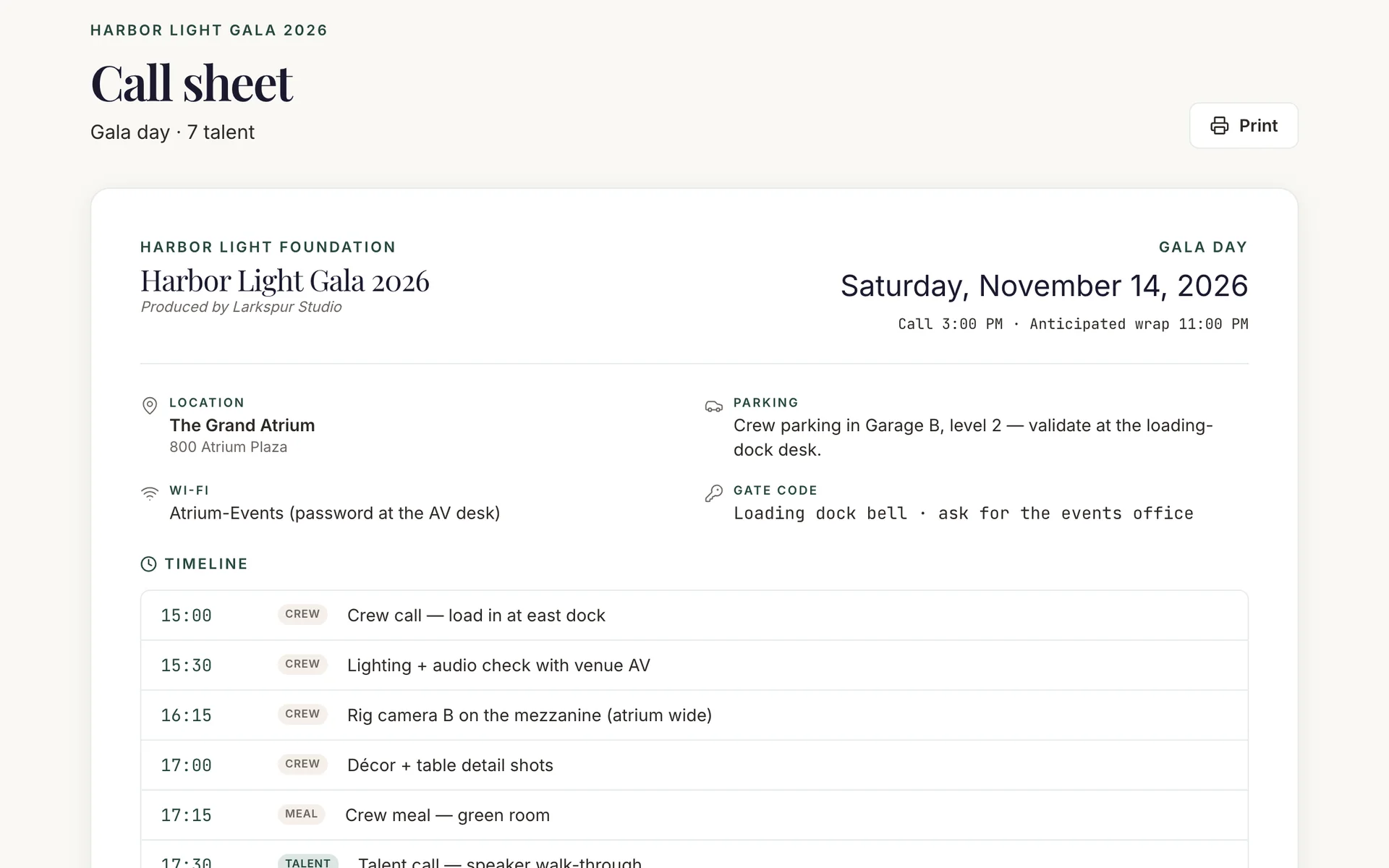
Chapter 03 · The photo lane
Darkroom
Get from the whole shoot to the keepers.
A desktop app for macOS and Windows that works through a shoot on your own machine. Pick, rate and label in four views, keep your metadata in XMP, and export watermarked proofs and contact sheets.
- Grid, single, burst and compare views for culling.
- Picks, stars and colour labels from the keyboard, with undo.
- RAW files from the major camera makers, plus JPEG and HEIC.
- Watermarked exports and contact sheets for sharing choices.
From — a monthTalk to us for pricing, or — a month added to Studio
Read the Darkroom chapter
Chapter 04 · The edit bay
Cutroom
The first pass of the edit, done inside DaVinci Resolve.
Cutroom opens as a panel in the editor you already use. It turns your interviews into a searchable transcript, plans the clean-up of silences and retakes, writes captions and chapters, and lays out a first assembly for you to shape.
- A transcript split by speaker that you can search and star.
- Silences and retakes found and cleared into a new timeline.
- Captions as SRT or VTT, and chapters with markers.
- A first assembly you can export to Resolve, Premiere or Final Cut.
From — a monthTalk to us for pricing
Read the Cutroom chapter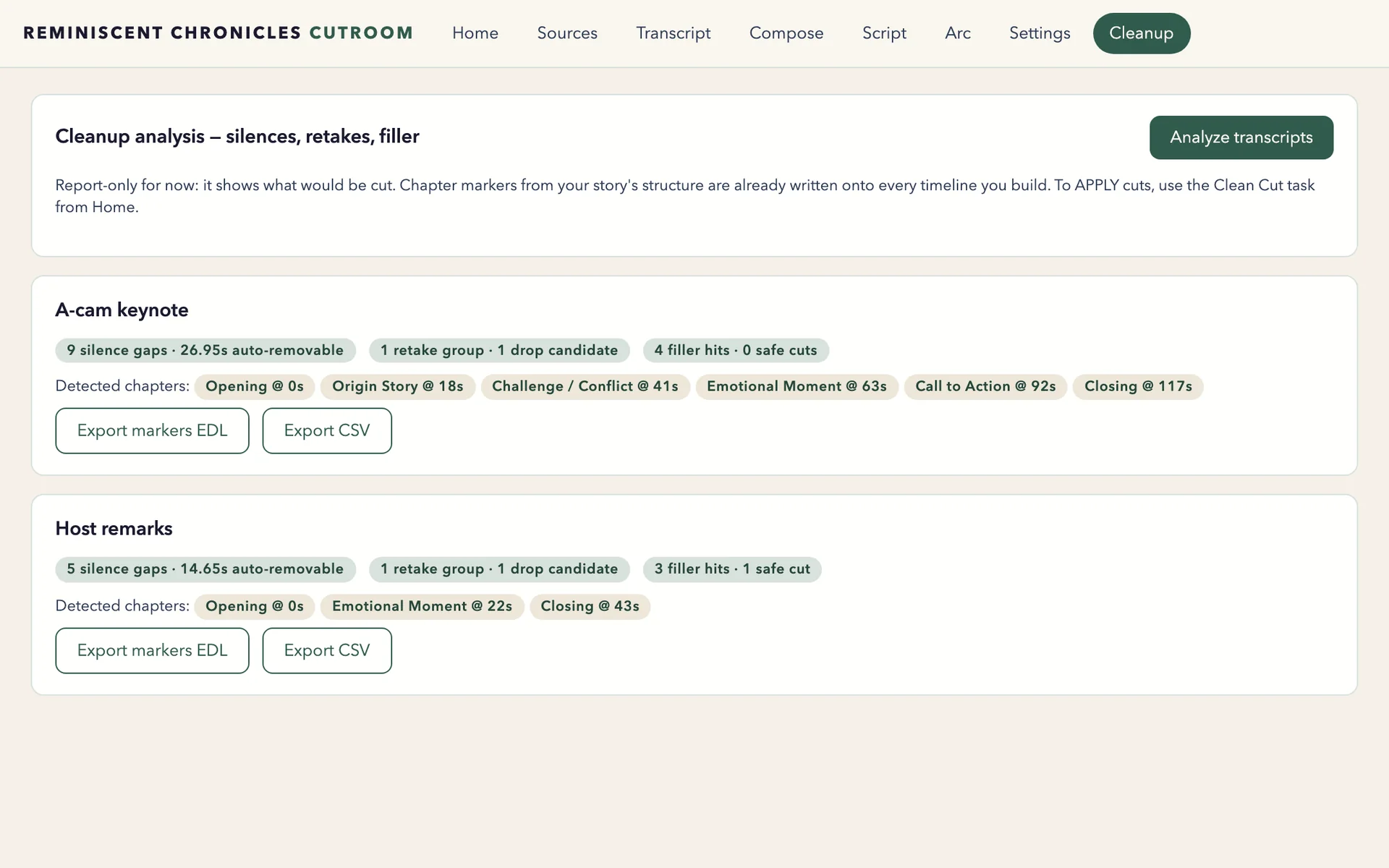
Chapter 05 · The review room
Post-Production
Notes on the frame, versions in order, approvals on the record.
Share a cut and collect feedback pinned to the exact moment. Versions stay in order, each reviewer signs off for themselves, and screenings let everyone watch together.
- Timecoded notes pinned to the exact frame.
- Versions kept in order, so v4 always knows it came after v3.
- Share links for clients and outside reviewers.
- Per-reviewer approval and watch-together screenings on Review Pro.
From — a monthTalk to us for pricing
Read the Post-Production chapter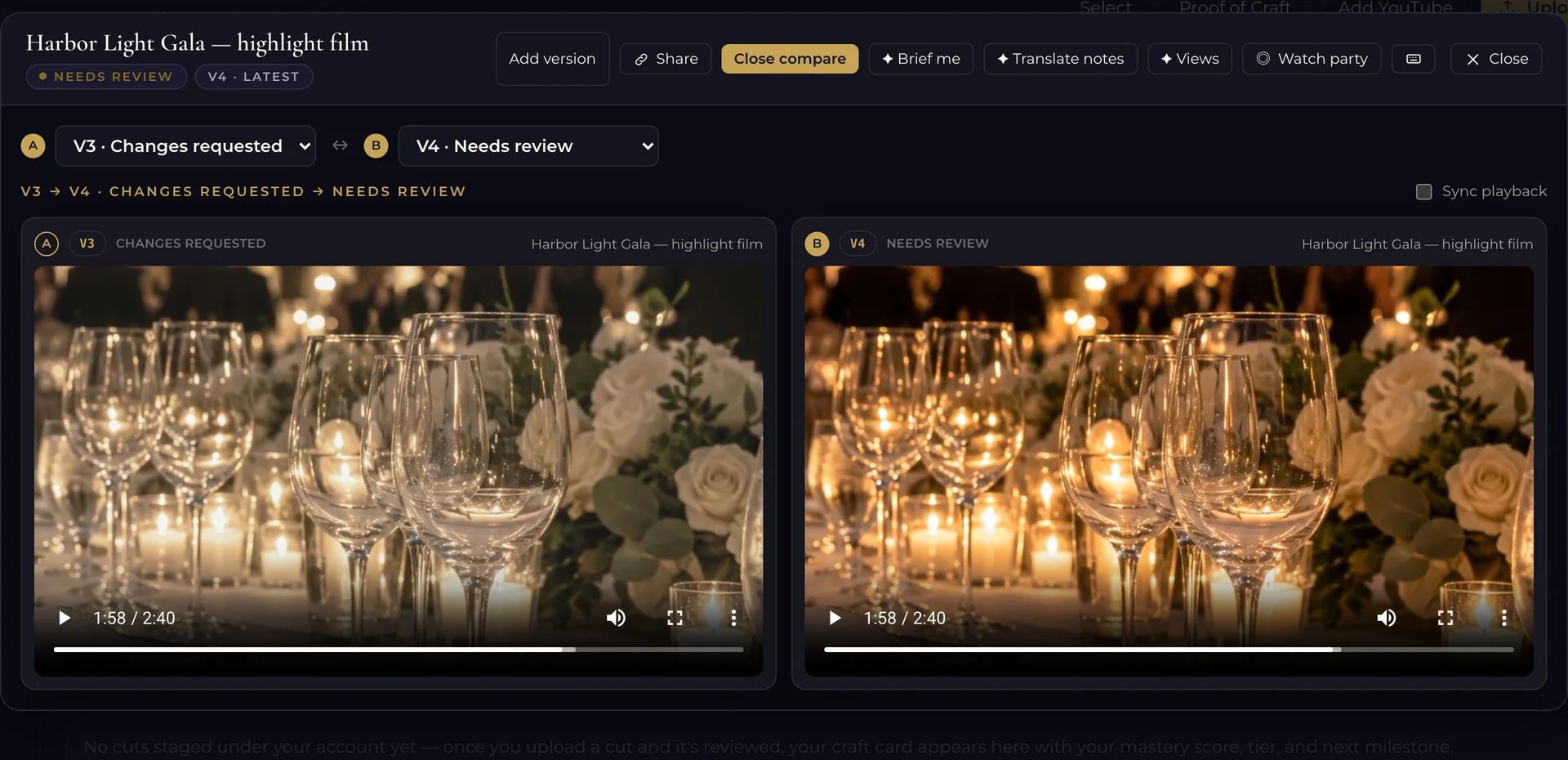
The arc
One client. Eight steps. A product for each.
Studio holds the client record from the first message to the last payment. CallBoard, Darkroom, Cutroom and Post-Production take on the work in between.
- InquiryA lead form or booking page creates the client and the project.Studio
- BookingProposal, signed contract and deposit.Studio
- Shoot daySchedule, call sheet, talent intake and releases.CallBoard
- CullRate, pick and label the photographs.Darkroom
- CutTranscript, clean-up, captions and a first assembly.Cutroom
- ReviewTimecoded notes, versions in order, sign-off.Post-Production
- DeliveryFinished work delivered in a client gallery.Studio
- PaymentThe final invoice is paid and the record is complete.Studio

Born in a working studio
Software that had to earn its keep on a real shoot day.
Reminiscent Chronicles grew from the systems Reminiscent Road Media built to run its own client work: the inquiries, the shoot days, the reviews and the invoices. The people who build it also send invoices, run productions and deliver cuts with it.
Features earn their place on a live production before they reach yours.
“Media work — and the software behind it — should treat every client’s narrative with the gravity it deserves.”

Built and run by Reminiscent Road Media, a creative studio in Houston, Texas.
Pricing
Start with one. Add the next when the work calls for it.
Every product has its own plans, priced per workspace in US dollars. Studio customers can add smaller CallBoard and Darkroom bundles.
| Product | For | From | Details |
|---|---|---|---|
| Studio | The business | — a monthTalk to us for pricing | Plans for Studio |
| CallBoard | The shoot day | — a monthTalk to us for pricing | Plans for CallBoard |
| Darkroom | The photo lane | — a monthTalk to us for pricing | Plans for Darkroom |
| Cutroom | The edit bay | — a monthTalk to us for pricing | Plans for Cutroom |
| Post-Production | The review room | — a monthTalk to us for pricing | Plans for Post-Production |
14-day free trial on every plan. No card needed to start. Build your own stack.
The next chapter
Open a workspace and write the first page.
Bring in your next client and send the first contract. The trial lasts 14 days and needs no card to start.